
Signal is hard to hack. The chat is encrypted by default, so a stranger on public Wi-Fi cannot read the messages. Telegram Secret Chat is encrypted when you turn it on. This page is the straight signal vs telegram vs DailyNewsTalk comparison for people who already have a phone in the room.
What about the people who already know your PIN? What about keeping your conversations private from your parents? From mom? From a boyfriend? They are not hacking you. They are opening an app. The lock screen can still show a name. The chat list still looks like a chat app. Archive and screen lock still leave a Signal icon.
This article will help you with that. First what Signal and Telegram get right, and what still sits on the phone after you use their hide tools. Then DailyNewsTalk: a chat app that opens as news until someone knows the lock button.
Imagine Tom chooses Signal because he believes it is a secure messaging app. Lilly sends him a message, but his mom already knows his phone PIN. She doesn’t need to hack anything. She can simply open Signal on his phone and see the chat if she can access the app.
Download DailyNewsTalk — iPhone and Android.
This is for chats on your own phone, not for reading someone else’s. If you stay in Signal or Telegram, the notes below still help you pick the right tool. They do not turn a famous messenger into a news app.
Updated October 2026. Written by Ratna, who tests private chat apps at SecretChatApp.
Signal is hard to hack. The icon is still Signal.
Signal encrypts messages, voice, and video by default. You do not flip a secret mode. Signal’s docs describe that model. Sealed Sender is their extra step so even the service sees less about who wrote to whom. That is the real safety story: a stranger, a company, a tap on public Wi-Fi.
Signal still looks like a messenger. The icon is easy to recognize. A notification still looks like chat. Someone who opens Signal on your phone can read the thread. Notification privacy can hide a name on the banner. Screen lock asks for Face ID before the inbox opens, but it does not hide the banner. The icon is still Signal. The chat list is still a chat list. Famous is not a hide.
Pick Signal when you need strong, widely audited encryption and you are fine with a known chat app on the home screen. Your mom is not a hacker. She is a person who already knows the PIN.
Signal requires a phone number for registration on iPhone and in the stable Android release. Signal usernames let you connect with people without sharing your phone number with them. DailyNewsTalk uses a usertag, not a phone number. Telegram uses a number for the account even when Secret Chat is on.
Hide your Signal number. Disappearing messages still sit in Signal.
Signal can hide who sees your number, and it can make a message vanish later. Those are privacy tools. They are not a hide for the app.
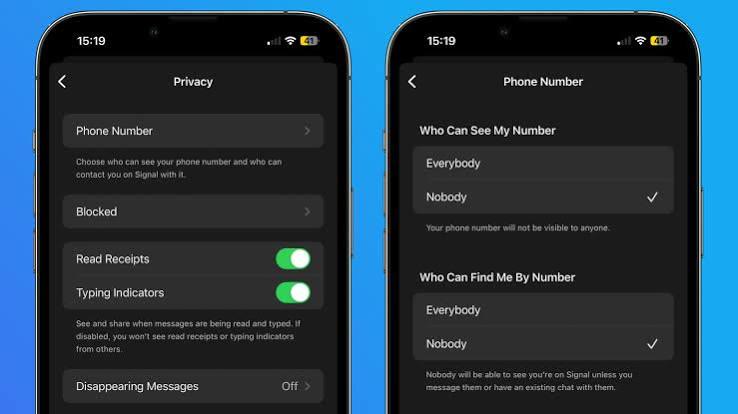
On iPhone, open Signal → Settings → Privacy. Phone Number lets you pick who can see the number and who can find you by it. You can set both to Nobody. Read Receipts and Typing Indicators can go off. Disappearing Messages can go on for a chat. The thread still sits in Signal. The icon is still Signal. A parent who already knows the PIN does not need your number to open the list.
Since February 2024, Signal also has usernames. Your phone number is hidden by default from anyone who hasn’t saved it in their contacts. If you set “Who can find my number” to Nobody, people need your exact username to start a chat with you. In the stable release you still need a number to create the account, and the app still looks like Signal.
Telegram Secret Chat is encrypted. It still sits in Telegram.
Telegram’s default chats are cloud chats. They sync. Telegram’s privacy policy says it stores them so you can use many devices. Groups are cloud chats too. There is no group Secret Chat.
Telegram Secret Chat adds end-to-end encryption for one person. You have to start it. It stays on those two devices. It still sits in Telegram with a lock and a green name. Telegram, being helpful, keeps the locked chat right there in the same app.
Archive and mute can move a thread off the main list. They do not take it out of Telegram. Archive is a folder with a quieter name. It is not a news screen.
Pick Telegram when you want cloud groups and bots, and you will remember to start a Secret Chat for the one thread that needs it.
The easy failure is sending the sensitive line in the cloud chat you already had open. Secret Chat is a second thread. It does not convert the old one. Screenshot alerts only apply once you are in that second thread, and they do not stop a second camera.
Telegram Web and the cross-platform Telegram Desktop app (Windows, Linux, and its Mac version) do not start Secret Chats. The separate native Telegram app for Mac can. If you live on desktop, Telegram’s optional lock is easy to miss. Signal’s default encryption follows you to the desktop app. DailyNewsTalk is a phone news screen. Do not expect it to be your desktop messenger.
One glance at the lock screen is enough
Even before anyone opens the app, the phone can tell the room. A Signal or Telegram notification on the lock screen can show the name and often the first line, so a parent glancing at the table already knows Lilly wrote Tom. Mute can keep the phone quiet. Mute is not the same switch as previews.
You can hide the preview at the phone level — start with how to hide notifications — but that is another setting to remember, and it still leaves a messenger icon and a chat list inside. A news-looking alert is the version that does not need the room to look away first. Signal screen lock, later on this page, does not hide that banner by itself.
DailyNewsTalk: a chat that looks like news
DailyNewsTalk is a full chat app that opens as a news app, which is the point of the hide. The purpose is not a tidier Signal inbox. The purpose is to keep the whole chat history private until someone already knows what the app is.
Open DailyNewsTalk and the person holding the phone sees headlines. There is no chat list on that first screen. To reach the threads they have to know it is a chat app, go to the news section, tap the lock button in the top bar, and unlock chat with a PIN — a short code only Tom should know. If they do not know those steps, they are still reading news.
Tom and Lilly sign in with a usertag — that is both the name and the secret — with no phone number and no “email me a reset code.” Photos stay out of Gallery. If the friendship goes sour, either of them can clear the thread on both phones. A new message still looks like news, so the lock screen does not show Lilly’s name.
It is paid. It does not publish a public security audit. Do not treat it as a replacement for Signal’s protocol. Treat it as a cover for a glance. After install, the home-screen name and icon become DailyNews. The store listing can still say DailyNewsTalk.
Listings: Google Play and the App Store. Or download DailyNewsTalk from one link. The on-site download page has the same stores.
Disclosure: we are associated with DailyNewsTalk. It is on this page so you can compare the news-screen hide with Signal and Telegram.
Do not pick DailyNewsTalk because you want a public write-up of the crypto. That write-up is not there. Pick it when the icon and the alert matter more than the audit. If you need both publicly documented security assurance and a news-style interface, you may need separate tools or compromise on one of those requirements.
Signal vs Telegram vs DailyNewsTalk
| What you want | Signal | Telegram | DailyNewsTalk |
|---|---|---|---|
| Default end-to-end encryption | Yes, every chat | No. Cloud chats are encrypted to Telegram’s servers only. End-to-end only in Secret Chat | Not Signal’s protocol |
| What someone with your phone sees | A famous messenger inbox | Telegram, including a green locked chat | Headlines, unless they know the lock |
| Stop the lock-screen name | A Signal alert, unless you hide previews | A Telegram alert, unless you hide previews | Alert looks like news |
| Identity | Phone number | Phone number | Usertag only |
| Sign up without a phone number | Not on iPhone. Android beta only ($2.99) | Needs a number. Anonymous Fragment numbers exist | Yes. Usertag only. |
| Archive a chat | Leaves the main list. A new message often puts it back. Archive is one tap away | Same idea: a quieter folder inside Telegram | There is no public chat list |
| Screen lock | Locks the whole app. Icon is still Signal. Often the same Face ID or phone PIN | App lock still looks like Telegram | News home, then a lock button and a PIN |
| Keep it hidden after a new message | No. The chat list is still Signal | No. Secret Chat still sits in Telegram | Yes. History stays behind the lock |
| Best for | Default, audited encryption | Cloud features, plus an optional lock | A glance at the home screen |
Signal encrypts every chat by default. Telegram offers end-to-end encryption through its optional Secret Chat feature, which still appears inside Telegram. DailyNewsTalk opens to a news-style screen, with chat history behind a lock.
Can you use Signal or Telegram without a phone number?
Not on iPhone, and not in the stable Android release. Signal began testing signup without a number in the Android 8.28 beta in September 2026 (one-time $2.99, Android only). Telegram’s account still starts from a number, though you can buy anonymous numbers through Fragment. According to its developer, DailyNewsTalk uses a user tag instead of a phone number for registration.
If the job is a messenger that never takes a SIM, start with messaging apps without a phone number. Telegram’s own caveats sit on Telegram without a phone number. WhatsApp is the same honest no: see WhatsApp without a phone number.
Hiding the number inside Signal is a different switch. Privacy → Phone Number can hide who sees it. In the stable release you still need a number to create the account. The icon is still Signal.
How to archive a chat in Signal
Use this on your own phone. Archive takes one thread off the main chat list. It does not hide Signal. It does not lock that one chat.
- Open Signal. Stay logged in. Go to Chats.
- Select the conversation.
- On iPhone, slowly swipe the chat to the left and tap Archive. On Android, swipe the chat to the right, or tap and hold it and choose Archive from the options at the top.
- The chat leaves the main chat list.
Signal’s archive help matches that idea. On iPhone it describes a slow swipe left, then Archive. On Android it lists a swipe right or tap-and-hold. Look for Archive, not a button that says Hide.
The icon is still Signal. The rest of the inbox is still a chat list. Archive is a folder with a quieter name. Your mom is not locked out. She just has one extra tap if she is curious.
Find archived Signal chats. They are one tap away.
The “hidden” thread is still in Signal. Same idea as Messenger archive: a quieter folder, not a lock.
- Open Signal.
- Scroll to the bottom of your chat list.
- Tap Archived Chats (iPhone) or Archived conversations (Android).
- The archived thread is there.
On Signal Desktop, open Signal Settings and choose View Archive.
A new message often puts activity back on the main list. Signal’s Keep muted chats archived note exists because that bounce is the default. Mute plus that setting can keep a quiet thread in Archive. Even then, Archive is one tap away, and the icon is still Signal.
Signal screen lock. It locks the app, not one chat.
Screen lock protects the whole app. It does not hide one thread. It does not hide lock-screen notifications by itself.
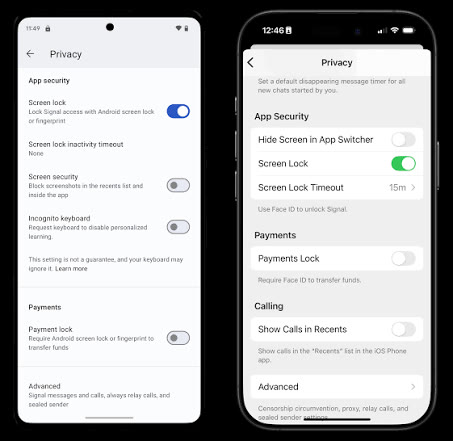
- Open Signal → Settings → Privacy → Screen lock.
- Turn it on.
- Use Face ID, Touch ID, or a passcode. Signal’s screen lock help says it uses the phone’s PIN, passphrase, or biometric unlock. That is not the same thing as the Signal PIN you set at signup.
The icon is still Signal. If someone know the phone PIN, or they already have Face ID on this phone, they can often open it. On iPhone, Hide Screen in App Switcher (on the same Privacy screen) can cover a preview in the app switcher. Android calls the similar setting Screen security. It still does not turn Signal into news.
How to choose without mixing the tools
Want every message encrypted without a special mode? Signal.
Want Telegram’s cloud, and one locked thread? Telegram Secret Chat. Then decide if the green name in the list is a problem.
Want the home screen to look like news? DailyNewsTalk. Then accept paid plans and no public audit.
You can use more than one. The mistake is using a Telegram cloud chat and calling it secret.
Write what you need on paper before you install anything. “The service must not read this” is Signal. “I already live in Telegram and I will start a second thread” is Telegram Secret Chat. “The home screen must look like news” is DailyNewsTalk. If you need two of those, use two apps. Do not force one app to fake the other.
Signal is for encryption, not for hiding the app. Telegram Secret Chat is for one private thread, not for hiding the inbox. DailyNewsTalk is for a glance at the home screen, not for beating Signal at encryption. Those three sentences are the whole page.
Messenger archive has the same bounce problem if you came from Facebook. Start with how to hide a message in Messenger. WhatsApp lock still looks like WhatsApp — see lock a chat in WhatsApp.
What none of them hide
A person with your phone passcode and time can open the app they find. They can check Screen Time. They can photograph the screen. Screenshot alerts do not stop a second camera. This page will not teach you to hunt through someone else’s phone.
People also ask
Is Telegram as private as Signal?
Not by default. Signal encrypts every chat. Telegram Secret Chat is closer for one thread. Groups and cloud chats are not.
Which is more secure, Signal or Telegram?
Signal, if “secure” means default encryption and an audited protocol. Telegram wins cloud features and a huge group size. Secret Chat is the Telegram mode that is encrypted end to end, and you have to start it.
Does DailyNewsTalk beat Signal or Telegram encryption?
No. It wins the glance on the home screen. It does not replace an audited messenger. Do not pick it to beat Signal at encryption.
Can I use Signal or Telegram without a phone number?
Signal: only in the Android beta ($2.99). Not on iPhone. Telegram: yes, technically, via Fragment anonymous numbers, but the account is still tied to a number. DailyNewsTalk is the usertag option on this comparison. For apps that never ask for a number, see messaging apps without a phone number. Do not treat a hidden Signal number as a no-number signup.
Does Signal have a secret chat mode?
Signal encrypts by default. There is no extra mode you flip for one thread. The inbox still looks like Signal.
Can someone read Signal if they know my phone PIN?
Yes, if they can unlock the phone and open the app. Screen lock may ask again, and it often uses the same Face ID, fingerprint, or phone PIN they already know. The icon is still Signal. Your mom is not a hacker.
Does Signal hide lock-screen notifications?
It can hide the name or the line if you change notification privacy. The banner can still look like Signal. Phone-level preview settings are a second switch. Screen lock does not hide that banner by itself. A news-looking alert does not need the room to look away first.
How do I archive a chat in Signal?
Open Signal and go to your chat list. On iPhone, slowly swipe the chat left and tap Archive. On Android, swipe it right, or tap and hold it and choose Archive. The chat leaves the main list. It does not leave Signal.
Where do archived Signal chats go?
Into the archive. Scroll to the bottom of your chat list and tap Archived Chats (iPhone) or Archived conversations (Android). Same idea as Messenger: a quieter folder, one tap away.
Does a new Signal message unarchive the chat?
Often, yes. A new message can put the thread back on the main list. Mute plus Keep muted chats archived can stop that bounce. Archive is still easy to open.
Can I hide the Signal icon?
Newer phones can do more than a hidden folder. iPhone (iOS 18 and later) can lock an app behind Face ID and move it into a hidden section, and many Android phones have a Private Space or app-hiding option. That hides the icon, but the chat list inside is still Signal’s, and someone who knows your phone passcode can often still unlock it. Signal’s own hide and lock tools still leave a Signal icon.
Is a Telegram group as private as Signal?
No. Telegram groups are cloud chats. Signal groups are encrypted by default. See Telegram Secret Chat.
Can I hide Telegram and keep using it?
You can archive and lock the app. The icon and the minutes can still say Telegram. Use the Telegram Secret Chat guide.
Can I use all three?
Yes. Use each for what it is good at. Do not send the same secret in all three and call that a plan.
Related guides
- secret messaging apps — the full map of hides that still show
- hide message in Messenger — archive comes back
- Telegram Secret Chat — the icon is still a paper plane
- lock a chat in WhatsApp — a locked folder still looks like WhatsApp
- how to hide text messages on iPhone — lock screen, Messages list, Photos
- hide text messages — the same hide on both phones
- how to hide notifications — when the lock screen still shows a name
- secret chat app for lovers — when a heart icon shouts too loud
- private chat app without a phone number — usertag, no email reset
- Download DailyNewsTalk — iPhone and Android
- Session messenger
- SimpleX Chat
- Threema