
iMessage and Google Messages are hard to hack. Chats between iMessage users, or between Google Messages users on RCS, are end-to-end encrypted, so a stranger on public Wi-Fi cannot read them. Archive, mute, app lock, Hide Alerts, and lock-screen previews are built for that: companies, random accounts, people who do not have your phone.
What about the people who already know your PIN? What about keeping your conversations private from your parents? From mom? From a boyfriend? They are not hacking you. They are opening Messages. That is why people still search how to hide text messages — on Android and on iPhone.
This article will help you with that. First the old hides on both phones: iPhone Messages, Android archive, notification hide, lock screen, app lock, second space, and iCloud on an iPad, and what still sits on the chat list after you use them. Then DailyNewsTalk: a chat app that opens as news until someone knows the lock button.
Tom hides Lilly on his iPhone so the inbox looks clean. Then he unlocks the iPad on the coffee table. Same Apple ID. Messages, being helpful, puts the thread right there. On Android, archive or a second space still looks like a chat app. Sync works against you.
Download DailyNewsTalk — iPhone and Android.
This is for chats on your own phone, not for reading someone else’s. If you stay in Messages, the taps below still tidy the inbox. They do not hide the app from someone who already knows the PIN.
Updated September 2026. Written by Ratna, who tests private chat apps at SecretChatApp.
How to hide text messages
On both phones the thread stays in Messages after you mute, archive, or lock the app. Hide Alerts and lock-screen previews hide a preview. They do not take the name off the list. The iPhone and Android steps below are the native hides. A chat that should not live in Messages needs a different app.
iPhone Messages hide. The thread is still in Messages.
Hiding text messages on iPhone usually means Hide Alerts, quieter lock-screen previews, or a Face ID lock on the Messages app. Those tools stop a stranger from reading a line on the table. They do not take Lilly off the chat list.
Hide Alerts is a mute. Swipe the thread, tap Hide Alerts, and the phone stays quiet. The row stays in the inbox. Search still finds the name. Anyone who can open Messages can still open the chat.
You can also turn off Show Previews so the lock screen does not quote the line. That is a notification hide, not a chat hide. The Messages icon is still Messages. The thread is still a thread. The long iPhone path is how to hide text messages on iPhone.
Good try, Tom. You hid the sound. Mom can still open the app.
iCloud and your iPad still show the chat
This is the hide that undoes itself in another room. If Messages in iCloud is on, the same Apple ID copies the thread to every signed-in device. An iPad on the couch, a Mac at the desk, a second iPhone that still has your login — they all get Lilly’s next message.
You can tidy one phone and still get caught on the iPad. Sync is being helpful for Apple. It is working against you if the secret is “this thread is not in the house.” Turning off iCloud on one device does not wipe the copies that already landed. A second phone or iPad that stays signed in is still a chat list.
If you needed the words to stay on one handset, you picked the wrong app. iMessage wants to follow you.
Android archive, lock, and second space still look like chat
Android gives you more folders than iPhone. Archive in Google Messages takes a row off the inbox. A new message can put it back. Anyone who can open Messages can open Archived. Archive is a folder with a quieter name.
Samsung Secure Folder and Android Private Space lock a copy of an app behind another PIN. Dual Messenger makes a second WhatsApp. Those are real locks. They still look like chat apps once they are open. A second space that opens to a chat list is still a chat list.
You can hide an icon in the launcher. You cannot hide what the app is after someone taps it. Calculator clones and fake games have their own tells. More on that in apps that look like games.
The lock screen still shows the name
Even before anyone opens the app, the phone can tell the room. A notification on the lock screen shows the name and often the first line, so a parent glancing at the table already knows Lilly wrote Tom. Mute and Hide Alerts keep the phone quiet. They are not the same switch as previews.
Android calls this Sensitive notifications or hide content on the lock screen. iPhone calls it Show Previews. Both can blank the quote. Both leave the chat app, the chat list, and the unread badge. Start with how to hide notifications if the glass is the first problem. A news-looking alert is the version that does not need the room to look away first.
App lock is a second lock on the same PIN
App lock can ask for Face ID, a fingerprint, or the phone PIN before Messages, WhatsApp, or Telegram opens. That is a lock on the whole app, not a hide of one chat. The icon is still a chat app.
Pixel phones are also getting a built-in App Lock (Android 17 QPR2 Beta 3, August 2026) that hides notification content for locked apps. The stable release is expected in December.
If the person already knows your phone PIN — parents, mom, a boyfriend — app lock often opens for them as well. It is a second lock on the same phone. Your mom is not a hacker. She is typing the code she already uses for maps.
How to hide text messages on Android when they already know the PIN
DailyNewsTalk is a full chat app that opens as a news app, which is the point of the hide. The purpose is not a tidy inbox. The purpose is to keep the whole chat history private until someone already knows what the app is. That is the same idea on Android and on iPhone.
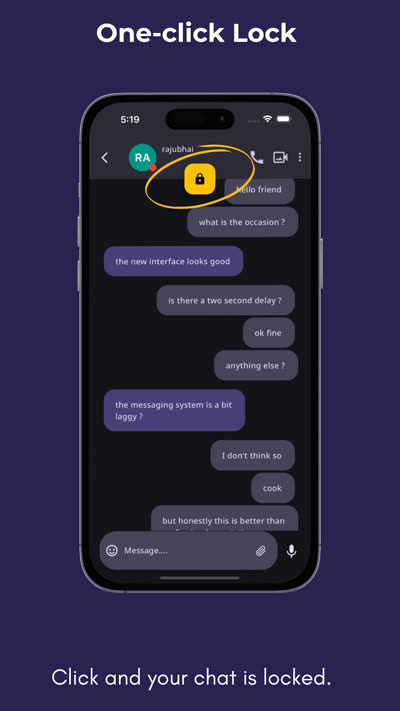
Open DailyNewsTalk and the person holding the phone sees headlines. There is no public chat list on that first screen, so a new message cannot bounce a name next to Mom and the family group. To reach the threads they have to know it is a chat app, tap the lock button in the top bar, and unlock chat with a PIN — a short code only Tom should know. If they do not know those steps, they are still reading news.
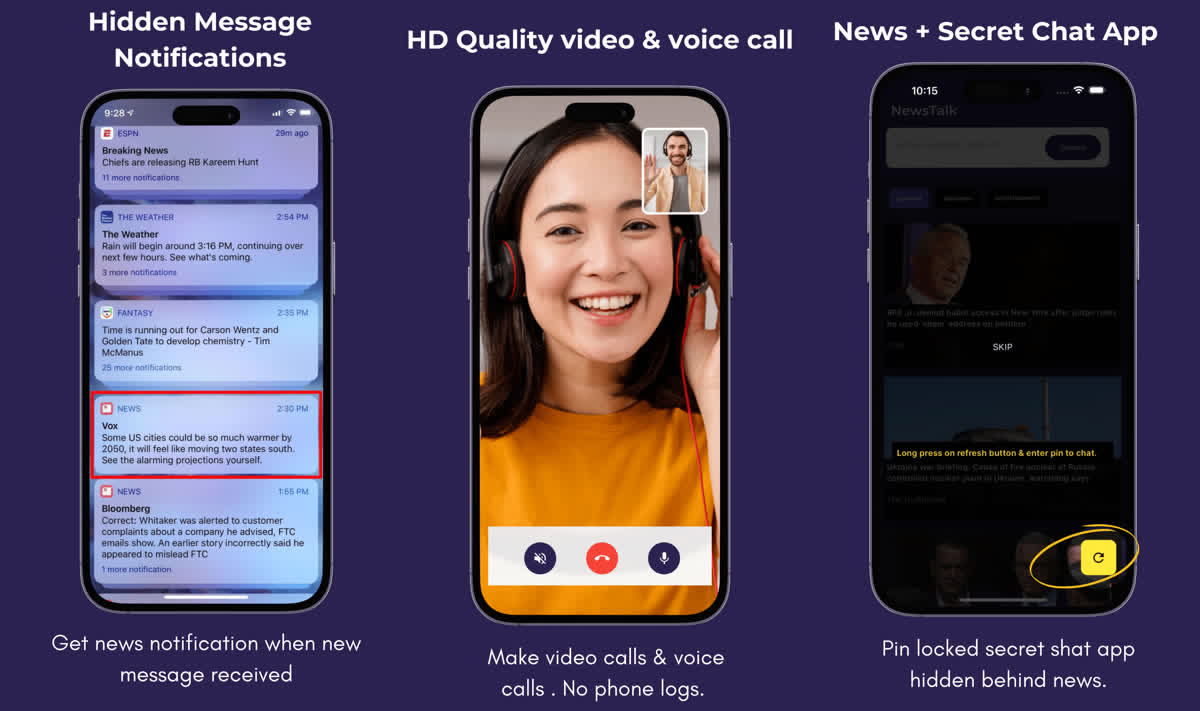
Tom and Lilly sign in with a usertag, which serves as their identifier, without needing a phone number or an email-based reset code. Photos stay out of Gallery. A new message still looks like news, so the lock screen does not show Lilly’s name.
Download DailyNewsTalk if you need a hide that still looks like news after the next message. If you stay in Messages, the taps below still work for a quieter phone. They do not turn archive into a hide from someone who already knows the PIN. Disclosure: We’re associated with DailyNewsTalk. It’s included here alongside the native options based on testing and publicly available information.
What you want vs what still shows
| What you want | iPhone Messages / iCloud | Android archive, lock, second space | DailyNewsTalk |
|---|---|---|---|
| Take the name off the chat list | No. Hide Alerts leaves the row | Archive can, until they write | There is no public chat list |
| Keep it hidden after a new message | No. The thread stays in Messages | No. Archive can come back | Yes. History stays behind the lock |
| Stop the lock-screen name | Only if you hide previews | Only if you hide sensitive content | Alert looks like news |
| What someone sees if they open the app | The inbox, then the thread | Messages, Archived, or a second chat app | Headlines, unless they know the lock |
| Second phone or iPad | iCloud copies the thread | Backups and clones can still sync | News first on each device |
| Identity | Phone number | Phone number | Usertag only |
| Photos | Often land in Photos | Often land in Gallery | Stay out of Gallery |
Archive files the chat. App lock repeats the PIN. iCloud copies the thread to the iPad. DailyNewsTalk is news first, lock button second, history last.
Native how-to if you stay in Messages
Stay here only if a quieter phone is enough. Do this on a phone that is yours.
iPhone. Open Messages, swipe left on the thread, and tap Hide Alerts if you want silence. Then open Settings → Notifications → Messages and set Show Previews to Never, or When Unlocked, if you do not want the lock screen to quote the line. On iOS 18 or later, touch and hold the Messages icon and tap Require Face ID. That still looks like Messages. Check every iPad and Mac signed into the same Apple ID. Sign out of the ones you do not want carrying the inbox.
Android. In Google Messages, touch and hold the conversation and tap Archive if you want the row off the inbox for now. Then open Settings → Notifications and hide sensitive content on the lock screen. Pixel labels this Sensitive notifications. Samsung hides content in the lock-screen style. If you use Secure Folder or Private Space, remember the app inside is still a chat app. Turn off notification history if old pings sit in a log.
WhatsApp lock, Telegram Secret Chat, and Messenger archive have the same shape: the icon still says chat. See lock a chat in WhatsApp, Secret Chat on Telegram, and hide messages on Messenger.
People also ask
How do I hide text messages on Android without deleting them?
Archive the thread in Google Messages, or move the app into Secure Folder or Private Space. Archive can come back when they write. A locked folder still opens to a chat list. DailyNewsTalk keeps the history behind a news home and a PIN.
How do I hide text messages on iPhone without deleting them?
Hide Alerts and hide notification previews. You cannot take one person off the Messages list and keep the history. iCloud can still copy the thread to an iPad. The iPhone-only page is how to hide text messages on iPhone.
Does Hide Alerts hide the chat from parents?
No. Hide Alerts stops the sound and the banner. The thread stays in the inbox. Anyone who can open Messages can still read it. Your mom is not a hacker. She is opening an app.
If I am signed in on an iPad, can they see my texts?
Yes, if Messages in iCloud is on and that iPad uses the same Apple ID. The iPad is another inbox. Hiding a preview on the iPhone does not hide the thread on the tablet.
Does Android archive hide texts from someone who knows my PIN?
No. They open Messages, they open Archived, they see the thread. A new message can also put the chat back on the list. Archive is filing. It is not a hide from someone holding the unlocked phone.
Can I hide the Messages app on iPhone?
You can move it off the first Home Screen or lock it with Face ID if your software has that switch. You cannot make Messages look like news. Opening the icon still opens a chat list.
Do calculator apps hide texts better than DailyNewsTalk?
They may hide an app icon, but their disguise can fail if someone tests the calculator’s functions or notices chat-related notifications. DailyNewsTalk opens on real headlines until someone taps the lock button.
Is it the same hide on Android and iPhone?
The fear is the same. A name on the lock screen. A thread in the list. A photo in Photos or Gallery. A second device that still has the inbox. The menus are different. The glance is not.
Related guides
- Secret messaging apps — the full map of hides that still show
- Hide text messages on iPhone — the iPhone-only path
- how to lock messages on iPhone — Face ID on Messages still leaves the thread in the app
- Hide notifications — when the lock screen still shows a name
- Lock a chat in WhatsApp — a locked folder still looks like WhatsApp
- Secret Chat on Telegram — the icon is still a paper plane
- Hide messages on Messenger — archive comes back
- Signal vs Telegram vs DailyNewsTalk — three apps, three looks
- Secret chat app for lovers — when a heart icon shouts too loud
- Apps that look like games — why a fake game still tells
- Download DailyNewsTalk — iPhone and Android
- hide Instagram messages
- hide Snapchat chats
- does Instagram notify a story screenshot