
Facebook Messenger is hard to hack. Meta is rolling out end-to-end encryption as the default for personal chats, so in an encrypted chat a stranger on public Wi-Fi cannot read the messages.
Archive, mute, restrict, and encryption address different privacy concerns, including unwanted messages and access by people outside the conversation.
What about the people who already know your PIN? What about keeping your conversations private from your parents? From mom? From a boyfriend? They are not hacking you. They are opening an app. That is why people still search how to hide message in messenger.
This article will help you with that. First the Messenger tools — archive, mute, ignore and restrict, delete, disappearing messages, encryption, App Lock, and lock-screen notifications — and what still sits on the chat list after you use them. Then DailyNewsTalk: a chat app that opens as news until someone knows the lock button.
Tom archives Lilly so the inbox looks clean. Then she sends one message. The thread jumps back onto the chat list like it never left. Mute only silences the alert. Archive is still a folder inside Messenger. And the lock screen can still show her name in a notification. That is a hide that unhides itself.
Download DailyNewsTalk — iPhone and Android.
This is for chats on your own phone, not for reading someone else’s. If you stay in Messenger, the steps below still help you tidy the inbox. They do not turn archive into a lock.
Updated September 2026. Written by Ratna, who tests private chat apps at SecretChatApp.
On this page
- Archive hides the chat. Then the next message puts it back.
- Anyone who can open Messenger can open Archive
- Mute stops the sound. It does not hide the chat.
- One glance at the lock screen is enough
- How to hide a message in Messenger when archive is not enough
- Archive vs mute vs DailyNewsTalk
- How to archive a chat on Messenger
- How to find hidden messages in Messenger
- Mute, Ignore, and Restrict
- Delete vs archive: hide a conversation without deleting it
- Encryption, disappearing messages, and App Lock
- How to turn on ghost mode on Messenger
- The laptop is still signed in
- How to hide Messenger chat from parents or a boyfriend
- People also ask
Archive hides the chat. Then the next message puts it back.
Archive is the button people reach for when they want a name off the chat list, and Meta describes it in plain language. Meta’s help page on Hiding or archiving a chat says archiving hides it from your inbox until the next time you chat with that person, and that a new message from the same person brings the chat back to your inbox. That is not a bug. That is the product being helpful.
So Tom archives the chat with Lilly and hands the phone to his brother for a map. Lilly writes “you there?” The archived row jumps back onto the chat list while the phone is still in his brother’s hands. I archived a test thread, muted it, and sent a message from a second account. The row came back to the top of the list even though the phone never made a sound.
Good try, Tom. You cleaned the inbox. She wrote back. The name is public again.
Anyone who can open Messenger can open Archive
The comeback is only half the problem. Archive is not a locked drawer. It is a folder inside the same app, and anyone who can open Tom’s Messenger can open it. On the phone, tap your profile picture at the top left, then Archived chats. On a computer, open Messenger on Facebook and choose Archived chats in the left menu. Find archived chats on Messenger is the official path, and it is the same path a parent or a sibling would use if they were curious.
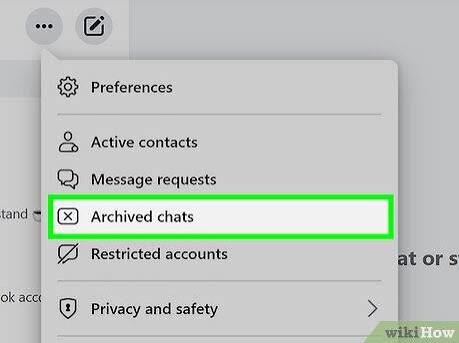
So even on the days Lilly does not write, the hide still depends on nobody tapping one menu. Archive is a folder with a quieter name. It is not a secret.
Mute stops the sound. It does not hide the chat.
Mute is the second tool people stack on top of archive. It solves a different problem. Mute stops the notification sound and the banner for one chat or for the whole app. It does not hide the row, and it does not keep an archived chat archived. I muted the test thread and archived it anyway, and the next inbound message still restored the chat to the list.
You think you bought silence and a clean list. You bought silence. The list still fills back up the moment Lilly writes. Mute stops the alert for that chat, but the row, the name, and the unread message are all still inside Messenger. Mute is a volume knob. Archive is a filing cabinet. Neither one hides the chat from someone holding the phone.
One glance at the lock screen is enough
Even before anyone opens the app, the phone can tell the room. A Messenger notification on the lock screen shows the name and often the first line, so a parent glancing at the table already knows Lilly wrote Tom. Archive does not touch the notification at all, so an unmuted chat can still show her name. Mute stops the alert for that one chat, but it doesn’t touch previews for the rest of your chats.
You can hide the preview at the phone level — start with how to hide notifications — but that is another setting to remember, and it still leaves the Messenger icon and the chat list inside. A news-looking alert is the version that does not need the room to look away first.
How to hide a message in Messenger when archive is not enough
DailyNewsTalk is a full chat app that opens as a news app, which is the point of the hide. The purpose is not a tidy inbox. The purpose is to keep the whole chat history private until someone already knows what the app is.
Open DailyNewsTalk and the person holding the phone sees headlines. There is no chat list on that first screen, so a new message cannot bounce a name next to Mom and the family group. To reach the threads they have to know it is a chat app, go to the news section, tap the lock button in the top bar, and unlock chat with a PIN — a short code only Tom should know. If they do not know those steps, they are still reading news.
Tom and Lilly sign in with a usertag — that is both the name and the secret — with no Facebook account, no phone number, and no “email me a reset code.” Photos stay out of Gallery. If the friendship goes sour, either of them can clear the thread on both phones, which archive and delete-for-you cannot do. A new message still looks like news, so the lock screen does not show Lilly’s name.
Download DailyNewsTalk if you need a hide that survives the next message. If you stay in Messenger, the taps below still work for a tidy inbox. They do not turn archive into a lock.
Archive vs mute vs DailyNewsTalk
| What you want | Messenger archive | Messenger mute | DailyNewsTalk |
|---|---|---|---|
| Take the row off the chat list | Yes, until they message you | No. The row stays | There is no public chat list |
| Keep it hidden after a new message | No. The chat unarchives | No. Mute does not lock archive | Yes. History stays behind the lock |
| Stop the lock-screen name | No. The notification can still show it | Stops the alert for that chat. The row stays. | Alert looks like news |
| What someone sees if they open the app | Inbox, then Archived chats in the menu. | The name still in Chats | Headlines, unless they know the lock |
| Identity | Facebook name | Facebook name | Usertag only |
Archive files the chat. Mute turns the volume down. DailyNewsTalk is news first, lock button second, history last.
How to archive a chat on Messenger
Use archive when you want the row gone for now and you are willing to let it come back. Do not use it if you need the name to stay gone after they write again.
On iPhone, swipe left on the chat in Chats and tap Archive. On Android, touch and hold the conversation, then tap Archive. Layouts move between versions, so look for a button labeled Archive or Hide. On a computer, open Messenger on Facebook, hover the chat, click Options, and choose Archive chat. The thread leaves the inbox and keeps its history.
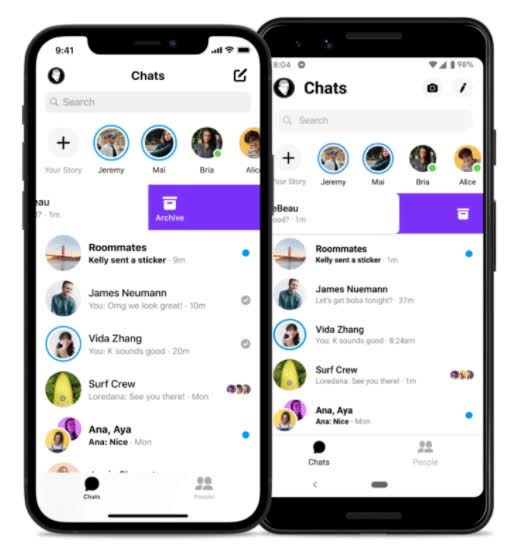
To unarchive on purpose, open Archived chats, then swipe left and tap Unarchive on the phone, or click Options and Unarchive chat on a computer. Sending a message in the chat brings it back too. Messenger will also unarchive for you the moment they write, which is why people think the app “un-hid” itself. It did. That is the design.
How to find hidden messages in Messenger
Hidden, in Messenger, almost always means archived, not gone. On the phone, tap your profile picture, then Archived chats. On a computer, open Messenger on Facebook and use Archived chats in the left menu. Sending a message in an archived chat brings it back to your inbox, and so does receiving one.
This is your own Archive folder. This page will not teach you to hunt through someone else’s phone.
Mute, Ignore, and Restrict
Mute stops notifications for one chat or for the whole app. It does not hide the row, and it does not keep an archived chat archived. Ignore messages is a filter, not delete: it moves the chat to Message Requests and stops notifications for it, but the chat still exists, so treat it as “get this out of my face,” not “this never happened.” Restrict is a separate tool. Which of the two you see depends on your app version.
Restrict is stronger. They can still message you, but their new messages go to Message Requests and they see less of your activity, and it is for people you do not want in your inbox. It is the wrong tool if both of you want the room and you only want other people not to see it. A shared secret is DailyNewsTalk, not Restrict.
Delete vs archive: hide a conversation without deleting it
Delete removes the thread from your view and you cannot undelete it. Archive keeps the history in Archived until you or a new message brings it back. Meta is blunt: if you want to hide a chat without deleting it, archive; if you delete, the history is gone on your side.
Their copy can stay. Delete for you only changes what you see. Delete for everyone can pull a sent message off their screen when Messenger still allows it, but tabs, downloads, and screenshots can remain. Meta can still review deleted messages if someone reports them within 14 days, or within 6 hours in end-to-end encrypted chats. Do not delete a thread you may need later, and do not treat delete as a hide that survives their phone, their laptop, or a screenshot they already took.
Encryption, disappearing messages, and App Lock
Messenger’s end-to-end encryption, which Meta is rolling out as the default for personal chats, is about who can read the words on the wire, not about who can see the name on your chat list. Secret Conversations, the old opt-in version, is being replaced by it. Avast and older WikiHow pages still sell Secret Conversations as a hide. Encryption stops a company or a stranger on Wi-Fi. It does not stop a parent who already holds the unlocked phone and opens Messenger. Your mom is not a hacker.
Disappearing messages, which work only inside end-to-end encrypted chats, can take a message off the screen after it is seen. Vanish mode no longer exists. Disappearing messages do not take the person off the list, and they do not stop a new message from restoring an archived chat. Use them when the words should die. Do not use them as a hide.
App Lock can ask for Face ID, a fingerprint, or the phone PIN before Messenger opens. That is a lock on the whole app, not a hide of one chat. The icon is still Messenger. If the person already knows your phone PIN — or the phone unlocks with their face too — App Lock often opens for them as well. It is a second lock on the same phone.
How to turn on ghost mode on Messenger
Ghost mode, in the way people mean it, is Active Status: you turn it off in Messenger settings so people do not see “Active now.” That hides your green dot. It does not hide the conversation, and it does not stop an archived chat from coming back. The thread is still in Chats, still searchable, and still ready to bounce back from Archive the next time they write. Facebook and Messenger have separate Active Status switches, so turn it off in both. It also does not hide read receipts, which have their own setting.
The laptop is still signed in
Then check the laptop. Archive on the phone does not log out a Facebook tab. Messenger on a computer now lives at facebook.com/messages, because messenger.com redirects there. If that tab is still Tom, the thread is still Tom. Open Facebook, and if Messenger loads, log out. You can also end the session from Accounts Center, then Password and security, then Where you’re logged in. A tidy phone and a logged-in laptop is how people get caught after they “cleaned” the app.
Read receipts and active status also ignore Archive. Unless Tom turned off Read receipts (Privacy & safety, then Read receipts), Lilly can still see that he saw it. Archiving first does not make him invisible. It only files the row until the next message.
How to hide Messenger chat from parents or a boyfriend
On your own phone, archive takes the name off the list until they write, and the Archive folder is still one tap away inside the same app. Mute keeps the phone quiet. App Lock still looks like Messenger. DailyNewsTalk keeps the history behind a news app and a lock button, so someone who already knows the phone PIN still has to know the app is chat.
This is not a guide to open or read their Messenger. If you stay in Messenger, tidy the inbox, hide notification previews, and sign out of the laptop. If you need the next message to stay off the chat list, that is the news app.
People also ask
How do I see hidden messages in Messenger?
On the phone, tap your profile picture, then Archived chats. On a computer, open Messenger on Facebook and click Archived chats in the left menu, then open the thread. Hidden, in Messenger, almost always means archived, not encrypted and not gone.
How do I turn on ghost mode on Messenger?
Turn off Active Status in Messenger settings so people do not see “Active now.” That is ghost mode as people mean it. It hides your green dot. It does not hide the conversation or stop an archived chat from coming back. Facebook and Messenger have separate Active Status switches, so turn it off in both. It also does not hide read receipts, which have their own setting.
Is my Messenger chat end-to-end encrypted?
Meta is making personal messages and calls end-to-end encrypted by default, and the rollout is ongoing. To check a chat, look for “End-to-end encrypted” in its chat settings. Some chat types, such as business and Marketplace chats, do not support it.
Can I have a secret conversation on Messenger?
Not as a separate feature. Secret Conversations was the old opt-in mode. Meta is replacing it by making personal chats end-to-end encrypted by default, and the rollout is still reaching everyone in stages. That protects the words from outsiders. It does not hide the name on your list, and it does not stop archive from coming back.
What happens when someone archives your chat on Messenger?
Nothing you can see. Their archive is on their inbox, not yours. You still have your copy, you can still message them, and when you do, the chat can reappear on their list. Archiving is not blocking, and it is not delete.
Can someone still message you if you archive the chat?
Yes. Archive does not mute them, block them, or warn them. They write like usual. Their new message is what puts the chat back on your list.
Can you hide a conversation on Messenger?
You can archive it, which hides it from Chats until the next time you chat with that person. That is a temporary hide. For a hide that keeps the whole history off the list after a new message, use DailyNewsTalk’s news screen and lock button.
When you archive a chat on Messenger, where does it go?
It goes to Archived chats: tap your profile picture on the phone, or use the left menu when you open Messenger on Facebook on a computer. The history stays there until you unarchive it or a new message brings it back.
How to hide a conversation in Messenger without deleting it?
Archive it. Swipe or hold the chat, tap Archive, and leave Delete alone. Remember the next message undoes the hide, even if you muted the thread.
Can you hide a chat in Messenger?
Yes, with Archive. Some versions of Messenger label this button Hide and others label it Archive. Either way, it is a temporary hide for the reason above.
How to hide Messenger chat from parents or a girlfriend?
On your own phone, archive takes the name off the list until they write, and the Archive folder is still one tap away inside the same app. DailyNewsTalk keeps the history behind a news app and a lock button, so someone who already knows the phone PIN still has to know the app is chat. This is not a guide to open or read their Messenger.
Can you do secret conversations on Messenger?
Not as a separate mode anymore. Personal chats are being encrypted by default, and in encrypted chats disappearing messages can make a message vanish after it is seen. Vanish mode is gone. Treat that as protection from a hack, not as a hide from the person standing next to you.
Did Messenger archive my chat by itself?
Archiving is manual. If a chat vanished from your list, check Archived chats first, then your Spam and Message Requests folders.
Is Ignore the same as delete?
No. Ignore is a filter. The chat can still exist. Delete removes the history from your view and you cannot undo it.
Can I hide the Messenger icon?
Some phones let you drop an app in a hidden folder or a second page. That is a weak hide. The notification can still show a name, and opening the icon still opens a chat list. A news app is cover that still works when the app is open.
Does delete for everyone wipe their laptop?
Not in a way you should trust. Delete for everyone can remove a sent message where Messenger still allows it. Browser tabs, downloads, and screenshots can stay. DailyNewsTalk offers an option to clear the conversation on both phones, but this does not guarantee that previously saved copies, screenshots, or other records are erased.
Does Messenger App Lock hide chats from someone who knows my PIN?
Usually no. App Lock often uses the same Face ID, fingerprint, or phone PIN they already know. The icon is still Messenger. It locks the app. It does not hide one chat, and it does not stop a notification on the lock screen unless you hide previews separately.
Related guides
- Secret messaging apps — the full map of hides that still show
- Hide notifications — when the lock screen still shows a name
- Lock a chat in WhatsApp — a locked folder still looks like WhatsApp
- Secret Chat on Telegram — the icon is still a paper plane
- Hide texts on Android and iPhone — the same hide outside Messenger
- Secret chat app for lovers — when a heart icon shouts too loud
- Apps that look like games — why a fake game still tells
- Download DailyNewsTalk — iPhone and Android
- hide Instagram messages
- hide Snapchat chats
- close last seen on Instagram
- hide an Instagram story from someone